Free & Open Source

Bible verses on screen,
automatically.

KAIRO listens to the preacher, works out which scripture is cited or quoted, and puts it on your church screens within a second or two. Try it: say a verse.

Say “John three sixteen”, or start quoting a verse.
KAIRO
Heard
Tap the button, then speak as a preacher would.
or type it

Your browser does the listening: Chrome and Edge send it to Google to write down, Safari to Apple. Nothing comes to us. This is a taste; the app hears far more.

Loading latest version…
Download for Mac Universal · Apple Silicon + Intel Download for Windows .msi installer Download for Linux .deb (Debian/Ubuntu) Download for Linux .rpm (Fedora/RHEL)

Fetching latest release from GitHub…

Installing, step by step

macOS

  1. Open the DMG and drag KAIRO into Applications.
  2. Double-click it. KAIRO is signed and checked by Apple, so it opens like any other app.

Windows

  1. Run the .msi. Windows may say “Windows protected your PC”, as it does for apps it hasn’t seen often.
  2. Click More info → Run anyway. You only do this once.

Linux

  1. Debian/Ubuntu: sudo dpkg -i KAIRO_*.deb, then open it from your apps menu.
  2. Fedora/RHEL: sudo rpm -i KAIRO-*.rpm
How it hears

However your preacher says it

Preachers don’t speak in tidy references. KAIRO follows the way they actually talk, and when it isn’t sure, it asks you instead of guessing.

Turn with me to John chapter three, verse sixteen
John 3:16The reference, as it’s said
For God so loved the world, that he gave his only begotten Son…
John 3:16Just reading it, no reference
Genesis twenty-one, verse one, and then we go to verse six
Genesis 21:1, 6Verses called together
God works everything together for good for those who love him
Romans 8:28In their own words: offered, not sent
Everything in KAIRO

Detection, plus the whole presentation system around it

Scripture on screen as it’s preached

KAIRO hears the reference, or the verse being read, and puts it up. “Verse 17” and “the next verse” still land, because it keeps the sermon’s book and chapter.

Live transcript

…so turn with me to John chapter three verse sixteen. For God so loved the world, that he gave…

Live queue
John 3:16LIVEFor God so loved the world, that he gave his only begotten Son…
John 3:17For God sent not his Son into the world to condemn…

Unsure? It asks first

A verse it isn’t sure of waits in Possible Matches for one click. A wrong verse on screen is worse than a missed one.

Possible matches
94%Romans 8:28Send
71%Philippians 4:13Send
52%Isaiah 40:31Send

No internet, no monthly bill

Speech is turned into text on your own computer. Nothing leaves the building, and nothing stops when the Wi-Fi does.

Listening offlineOn this computer
InternetNot needed
Keeps up through a long serviceStart to finish

Learns your preacher

Correct it once and KAIRO remembers how your preacher says a book, which verses your church returns to, and what you took down.

Heard Zom one ten, verse one
↓ you put up Psalm 110
Next time Zom one twenty one → Psalm 121:1

Your church’s Bibles

The KJV and Berean Standard Bible built in, the NIV, NLT and more free through API.Bible, or a Bible file you already have.

KJVBSBNIVNLTThe MessageEspañolFrançaisYorùbáKiswahili

Also in KAIRO: slides, songs, timers and media · Theme Studio · works with any app that reads NDI, Syphon or Spout

Every screen gets its own look

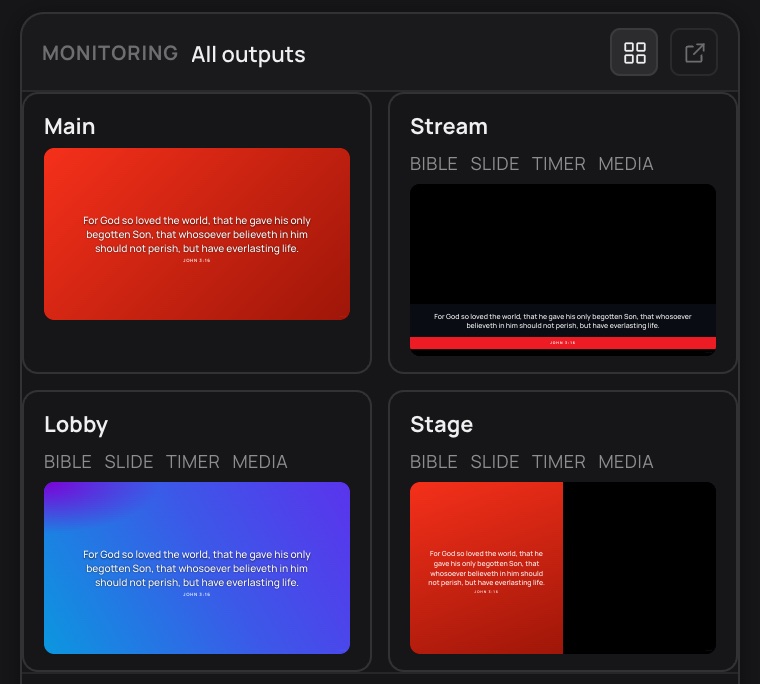
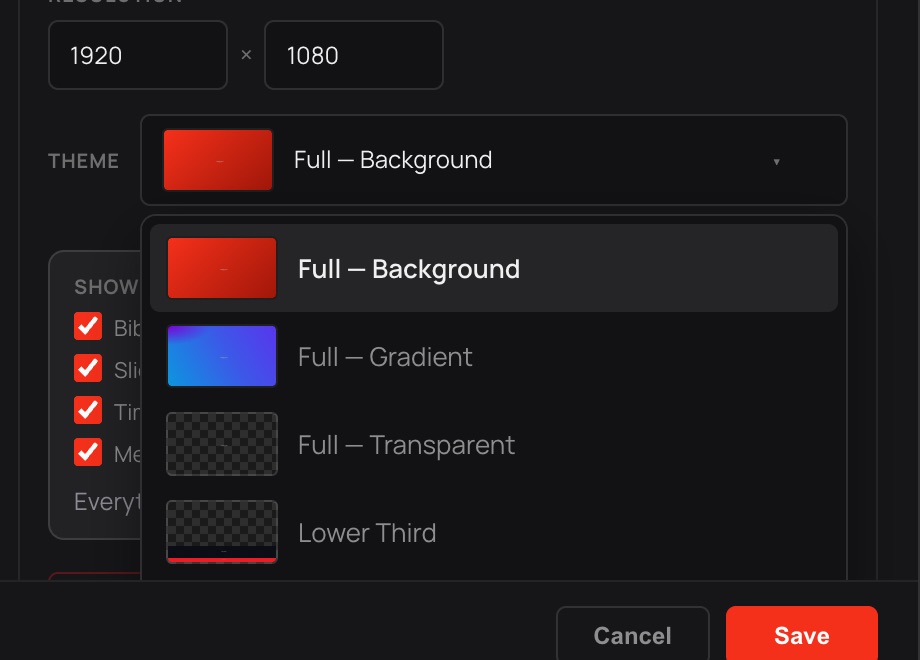
The projector, the livestream, the lobby TV and the stage monitor each get their own theme, from one verse going up once.

KAIRO's monitor showing the same verse on four outputs, each in its own theme Choosing a theme for an output in KAIRO

Cameras and scripture, one switcher

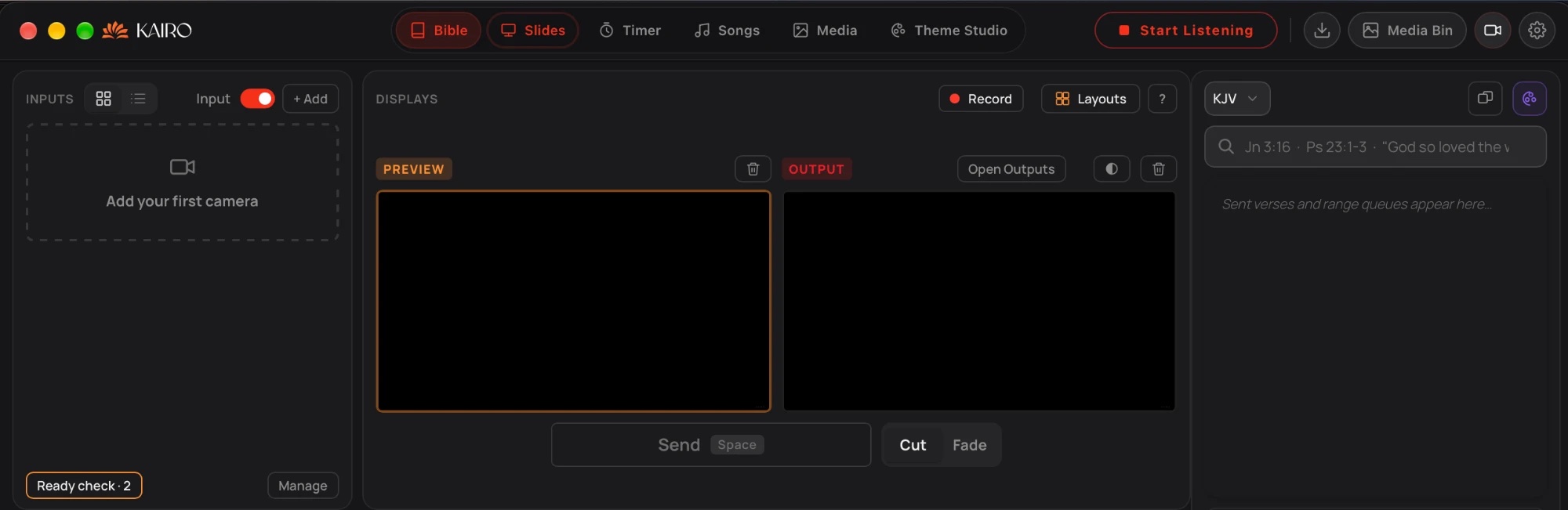
Turn on Director mode and KAIRO becomes a switcher for your cameras, with the verse placed beside the preacher.

KAIRO in Director mode: inputs, Preview and Output, and the verse queue
Requirements

What you need

A computer

A Mac with macOS 12 or later (offline listening on Apple Silicon needs macOS 14), Windows 10 or 11, or Ubuntu, Debian or Fedora. An ordinary office PC with 8 GB of memory is plenty.

The preacher’s sound

A feed from your sound desk or a USB audio interface. The computer’s own microphone is fine for trying it.

Internet

Only to download KAIRO and its offline speech model. After that, services run without it.

Optional

A screen or projector per output, a Deepgram key for cloud listening, NDI Tools for NDI outputs, a DeckLink card, cameras for Director mode.